


本教程为openssl-1.1.1j.tar.gz为例子
第一步:下载OpenSSL源码
下载地址: https://www.openssl.org/source/
个人网盘: https://pan.pigeoooon.site/#/s/o8TJ
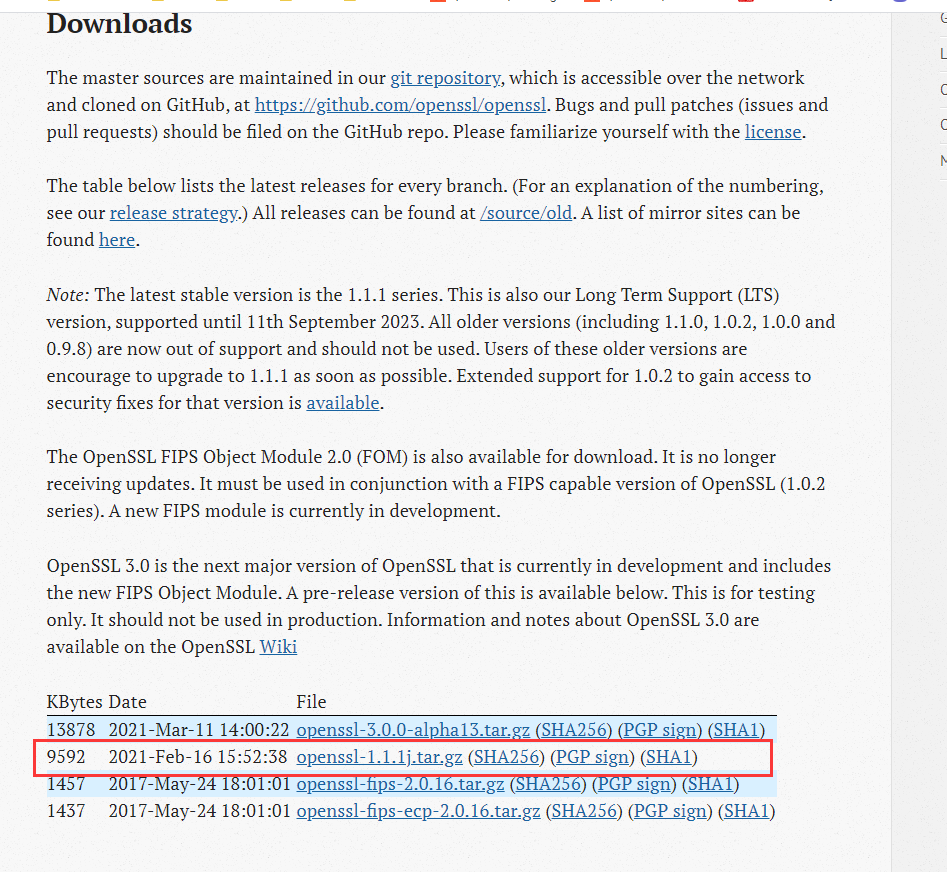
选择 openssl-x.x.x?.tar.gz 其中 x.x.x? 为目前最新版本号
解压到任意目录下,后续的目录均用 PATH 代替
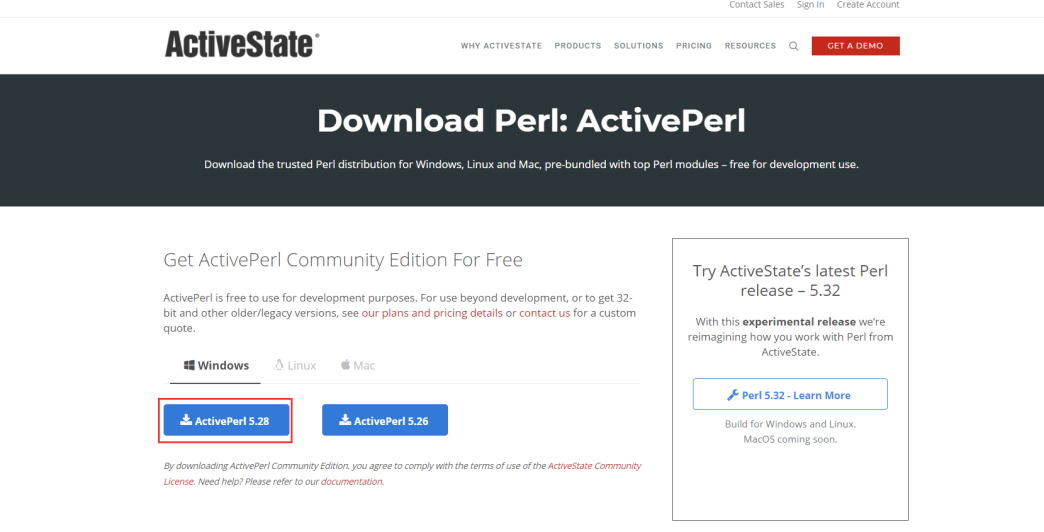
第二步:下载安装ActivePerl
下载地址:https://www.activestate.com/activeperl/downloads/
个人网盘: https://pan.pigeoooon.site/#/s/m4sP
如果这个网址打不开的话,可以直接百度搜索ActivePerl下载。
运行安装程序,一直下一步操作安装完成。这里默认安装在C:\Perl64。
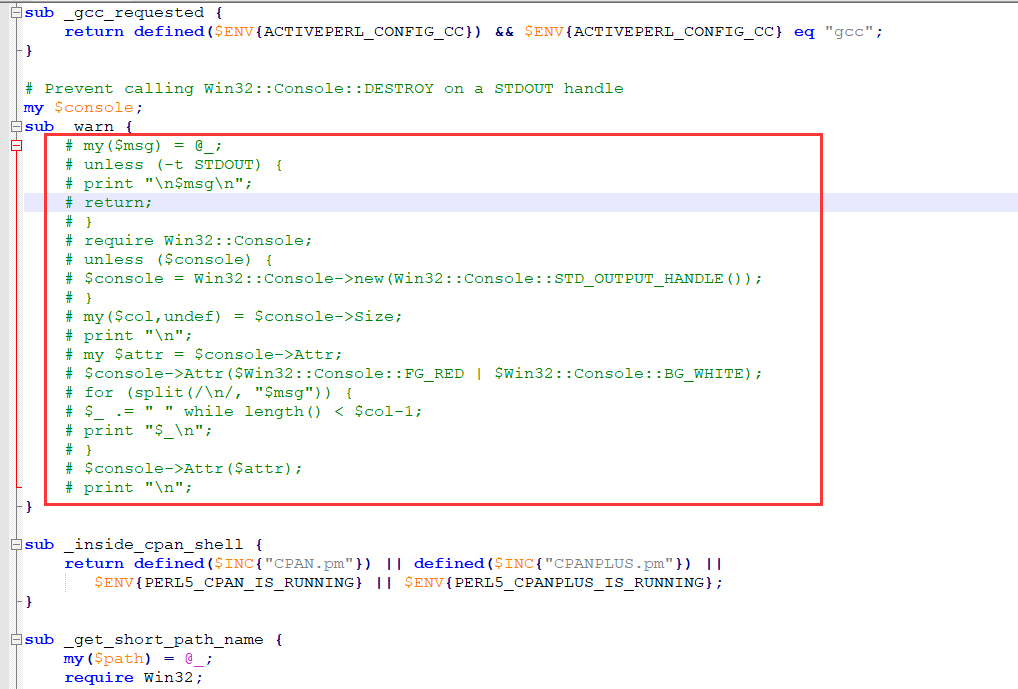
打开 C:\Perl64\site\lib\ActivePerl\Config.pm 文件,将400行左右的代码注释掉,如下图。
第三步:编译64位版本
1、打开VS2019的 x86_x64 Cross Tools Command Prompt for VS 2019 软件

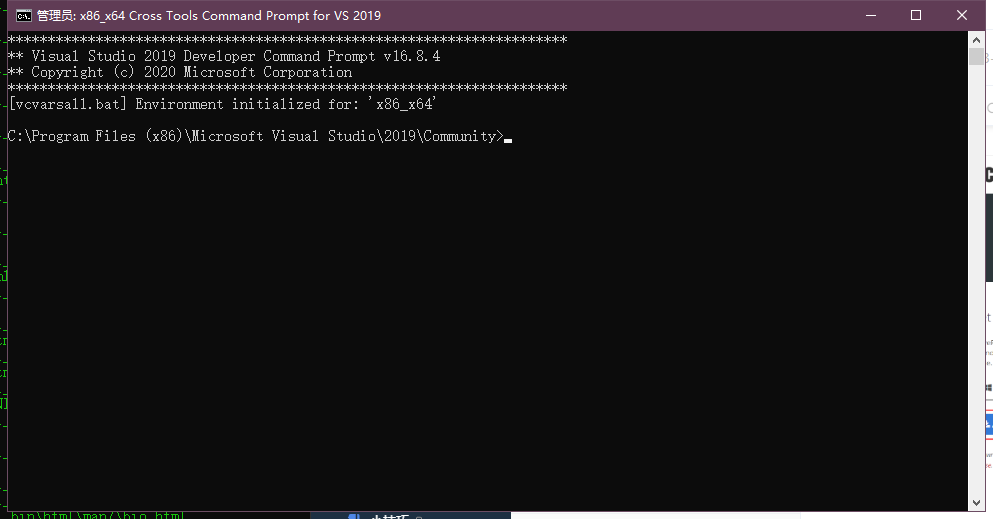
2、使用 cd /d PATH 到我们的解压目录
3、使用 perl Configure VC-WIN64A no-asm no-shared --prefix="C:\Program Files\openssl_bin" 进行生成编译脚本
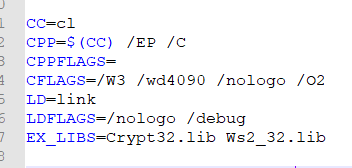
4、如果编译不过,出现LNK2019等错误的时候,你可能还需要添加ws2_32.lib,crypt32.lib库。打开我们的 PATH 目录下 makefile 文件,将如下位置 EX_LIBS 后添加 Crypt32.lib Ws2_32.lib
5、使用 nmake 进行编译
6、使用 nmake test 进行测试,出现 Result: PASS 则为成功
7、使用 nmake install 将编译好的文件拷贝到我们设定的目录下 C:\Program Files\openssl_bin
8、使用 nmake clean 清除上次静态库的编译,以便重新编译
第四步:编译32位版本
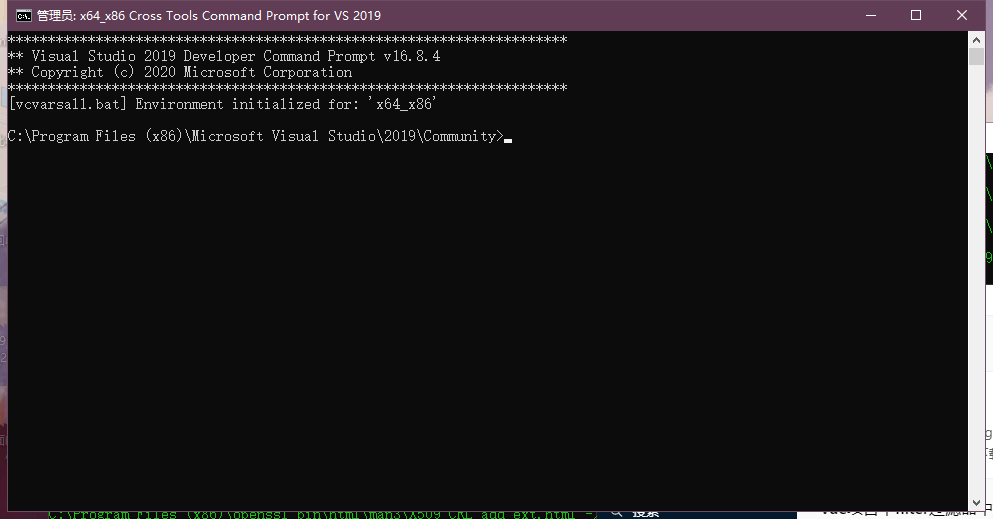
1、打开VS2019的 x64_x86 Cross Tools Command Prompt for VS 2019 软件

2、使用 cd /d PATH 到我们的解压目录
3、使用 perl Configure VC-WIN32 no-asm no-shared --prefix="C:\Program Files (x86)\openssl_bin" 进行生成编译脚本
4、如果编译不过,出现LNK2019等错误的时候,你可能还需要添加ws2_32.lib,crypt32.lib库。打开我们的 PATH 目录下 makefile 文件,将如下位置 EX_LIBS 后添加 Crypt32.lib Ws2_32.lib
5、使用 nmake 进行编译
6、使用 nmake test 进行测试,出现 Result: PASS 则为成功
7、使用 nmake install 将编译好的文件拷贝到我们设定的目录下 C:\Program Files (x86)\openssl_bin
8、使用 nmake clean 清除上次静态库的编译,以便重新编译
第五步:使用openssl库
1、给项目包含目录添加我们编译好的openssl库文件中的 include 目录
2、在使用openssl库函数时,添加如下头文件(按需添加)即可,一下使用RSA为例:
#include <openssl/rsa.h>
#include <openssl/engine.h>
#include <openssl/pem.h>
#include <openssl/err.h>
3、将我们编译好的静态文件 libcrypto.lib 和 libssl.lib 添加至我们的项目中
#pragma comment(lib, "libssl.lib")
#pragma comment(lib, "libcrypto.lib")
4、进行编译,若出现如下错误请添加 ws2_32.lib 依赖
1>libcrypto.lib(b_sock.obj) : error LNK2019: 无法解析的外部符号 __imp_ioctlsocket,函数 BIO_socket_ioctl 中引用了该符号
1>libcrypto.lib(b_sock.obj) : error LNK2019: 无法解析的外部符号 __imp_getsockname,函数 BIO_sock_info 中引用了该符号
1>libcrypto.lib(b_sock.obj) : error LNK2019: 无法解析的外部符号 __imp_getsockopt,函数 BIO_sock_error 中引用了该符号
1>libcrypto.lib(b_sock2.obj) : error LNK2001: 无法解析的外部符号 __imp_getsockopt
1>libcrypto.lib(b_sock.obj) : error LNK2019: 无法解析的外部符号 __imp_ntohs,函数 BIO_get_port 中引用了该符号
1>libcrypto.lib(b_addr.obj) : error LNK2001: 无法解析的外部符号 __imp_ntohs
1>libcrypto.lib(b_sock.obj) : error LNK2019: 无法解析的外部符号 __imp_gethostbyname,函数 BIO_gethostbyname 中引用了该符号
1>libcrypto.lib(b_sock.obj) : error LNK2019: 无法解析的外部符号 __imp_WSAStartup,函数 BIO_sock_init 中引用了该符号
1>libcrypto.lib(b_sock.obj) : error LNK2019: 无法解析的外部符号 __imp_WSACleanup,函数 bio_sock_cleanup_int 中引用了该符号
1>libcrypto.lib(b_sock.obj) : error LNK2019: 无法解析的外部符号 __imp_WSAGetLastError,函数 BIO_accept 中引用了该符号
1>libcrypto.lib(bss_sock.obj) : error LNK2001: 无法解析的外部符号 __imp_WSAGetLastError
1>libcrypto.lib(b_sock2.obj) : error LNK2001: 无法解析的外部符号 __imp_WSAGetLastError
1>libcrypto.lib(b_addr.obj) : error LNK2019: 无法解析的外部符号 __imp_getaddrinfo,函数 BIO_lookup 中引用了该符号
1>libcrypto.lib(b_addr.obj) : error LNK2019: 无法解析的外部符号 __imp_freeaddrinfo,函数 BIO_ADDRINFO_free 中引用了该符号
1>libcrypto.lib(b_addr.obj) : error LNK2019: 无法解析的外部符号 __imp_getnameinfo,函数 addr_strings 中引用了该符号
1>libcrypto.lib(bss_sock.obj) : error LNK2019: 无法解析的外部符号 __imp_recv,函数 sock_read 中引用了该符号
1>libcrypto.lib(bss_sock.obj) : error LNK2019: 无法解析的外部符号 __imp_send,函数 sock_write 中引用了该符号
1>libcrypto.lib(bss_sock.obj) : error LNK2019: 无法解析的外部符号 __imp_WSASetLastError,函数 sock_write 中引用了该符号
1>libcrypto.lib(b_sock2.obj) : error LNK2019: 无法解析的外部符号 __imp_accept,函数 BIO_accept_ex 中引用了该符号
1>libcrypto.lib(b_sock2.obj) : error LNK2019: 无法解析的外部符号 __imp_bind,函数 BIO_bind 中引用了该符号
1>libcrypto.lib(b_sock2.obj) : error LNK2019: 无法解析的外部符号 __imp_closesocket,函数 BIO_accept_ex 中引用了该符号
1>libcrypto.lib(b_sock2.obj) : error LNK2019: 无法解析的外部符号 __imp_connect,函数 BIO_connect 中引用了该符号
1>libcrypto.lib(b_sock2.obj) : error LNK2019: 无法解析的外部符号 __imp_listen,函数 BIO_listen 中引用了该符号
1>libcrypto.lib(b_sock2.obj) : error LNK2019: 无法解析的外部符号 __imp_setsockopt,函数 BIO_connect 中引用了该符号
1>libcrypto.lib(b_sock2.obj) : error LNK2019: 无法解析的外部符号 __imp_socket,函数 BIO_socket 中引用了该符号
#pragma comment(lib, "ws2_32.lib")
5、若出现如下错误请添加 Crypt32.lib 依赖
1>libcrypto.lib(e_capi.obj) : error LNK2019: 无法解析的外部符号 __imp_CertOpenStore,函数 capi_list_certs 中引用了该符号
1>libcrypto.lib(e_capi.obj) : error LNK2019: 无法解析的外部符号 __imp_CertCloseStore,函数 capi_find_key 中引用了该符号
1>libcrypto.lib(e_capi.obj) : error LNK2019: 无法解析的外部符号 __imp_CertEnumCertificatesInStore,函数 capi_find_cert 中引用了该符号
1>libcrypto.lib(e_capi.obj) : error LNK2019: 无法解析的外部符号 __imp_CertFindCertificateInStore,函数 capi_find_cert 中引用了该符号
1>libcrypto.lib(e_capi.obj) : error LNK2019: 无法解析的外部符号 __imp_CertDuplicateCertificateContext,函数 capi_load_ssl_client_cert 中引用了该符号
1>libcrypto.lib(e_capi.obj) : error LNK2019: 无法解析的外部符号 __imp_CertFreeCertificateContext,函数 capi_dsa_free 中引用了该符号
1>libcrypto.lib(e_capi.obj) : error LNK2019: 无法解析的外部符号 __imp_CertGetCertificateContextProperty,函数 capi_cert_get_fname 中引用了该符号
最后为RSA的完整示例代码
RSA头文件
#pragma once

#include <openssl/rsa.h>
#include <openssl/engine.h>
#include <openssl/pem.h>
#include <openssl/err.h>
#include <string>

#pragma comment(lib, "ws2_32.lib")
#pragma comment(lib, "Crypt32.lib")
#pragma comment(lib, "libssl.lib")
#pragma comment(lib, "libcrypto.lib")

/// <summary>
/// 生成私钥公钥
/// </summary>
/// <param name="nPrime">素数, 默认值65537是官方推荐的一个数字</param>
/// <param name="nKeySize">密钥的位数, 默认值2048, 可以是别的值, 但最好是4的倍数, 且至少为1024</param>
/// <param name="strSavePath">存储位置, 默认值当前路径</param>
void CreateRSAPrivateAndPublicKey(int nPrime = 65537, int nKeySize = 2048, std::string strSavePath = "");

/// <summary>
/// 私钥加密
/// </summary>
/// <param name="strPrivateKey">私钥</param>
/// <param name="strData">明文</param>
/// <returns>密文</returns>
std::string RSAPrivateEncrypt(const std::string& strPrivateKey, const std::string& strData);

/// <summary>
/// 私钥解密
/// </summary>
/// <param name="strPrivateKey">私钥</param>
/// <param name="strData">密文</param>
/// <returns>明文</returns>
std::string RSAPrivateDecrypt(const std::string& strPrivateKey, const std::string& strData);


/// <summary>
/// 公钥加密
/// </summary>
/// <param name="strPublicKey">公钥</param>
/// <param name="strData">明文</param>
/// <returns>密文</returns>
std::string RSAPublicEncrypt(const std::string& strPublicKey, const std::string& strData);

/// <summary>
/// 公钥解密
/// </summary>
/// <param name="strPublicKey">公钥</param>
/// <param name="strData">密文</param>
/// <returns>明文</returns>
std::string RSAPublicDecrypt(const std::string& strPublicKey, const std::string& strData);
RSA源文件
#include "RSA.h"
#include <assert.h>

// 生成新的公钥和私钥
void CreateRSAPrivateAndPublicKey(int nPrime, int nKeySize, std::string strSavePath)
{
 RSA* rsa = RSA_new();
 BIGNUM* e = BN_new();
 BN_set_word(e, nPrime);    // 65537是官方推荐的一个数字, 其实任意素数都是可以的
 RSA_generate_key_ex(rsa, nKeySize, e, 0);    // 2048表示密钥的位数, 可以是别的值, 但最好是4的倍数, 且至少为1024

 // 使用BIO打开密钥文件
 std::string privatePath = strSavePath + "privateKey.pem";
 BIO* _pri = BIO_new_file(privatePath.c_str(), "w");
 // 写入密钥
 PEM_write_bio_RSAPrivateKey(_pri, rsa, NULL, NULL, 0, NULL, NULL);
 // 使用BIO打开公钥文件
 std::string publicPath = strSavePath + "publicKey.pem";
 BIO* _pub = BIO_new_file(publicPath.c_str(), "w");
 // 写入公钥
 PEM_write_bio_RSAPublicKey(_pub, rsa);

 BIO_free(_pub);
 BIO_free(_pri);
 BN_free(e);
 RSA_free(rsa);
 CRYPTO_cleanup_all_ex_data();
}

// 私钥加密
std::string RSAPrivateEncrypt(const std::string& strPrivateKey, const std::string& strData)
{
 // 判断是否为空
 if (strPrivateKey.empty()  strData.empty())
 {
     assert(false);
     return "";
 }

 // 读取私钥
 RSA* pRSAPrivateKey = RSA_new();
 BIO* bio = BIO_new(BIO_s_mem());
 BIO_write(bio, strPrivateKey.c_str(), strPrivateKey.size());
 pRSAPrivateKey = PEM_read_bio_RSAPrivateKey(bio, NULL, NULL, NULL);
 if (pRSAPrivateKey == nullptr)
 {
     assert(false);
     return "";
 }

 // 获取密钥长度
 int nLen = RSA_size(pRSAPrivateKey);

 // 返回结果
 std::string strRet;

 // 加密
 char* pEncode = new char[nLen + 1];
 int ret = RSA_private_encrypt(strData.length(), (const unsigned char*)strData.c_str(), (unsigned char*)pEncode, pRSAPrivateKey, RSA_PKCS1_PADDING);
 if (ret >= 0)
 {
     strRet = std::string(pEncode, ret);
 }
 // 释放资源
 delete[] pEncode;
 RSA_free(pRSAPrivateKey);
 CRYPTO_cleanup_all_ex_data();
 return strRet;
}

// 私钥解密
std::string RSAPrivateDecrypt(const std::string& strPrivateKey, const std::string& strData)
{
 // 判断是否为空
 if (strPrivateKey.empty()  strData.empty())
 {
     assert(false);
     return "";
 }

 // 读取私钥
 RSA* pRSAPrivateKey = RSA_new();
 BIO* bio = BIO_new(BIO_s_mem());
 BIO_write(bio, strPrivateKey.c_str(), strPrivateKey.size());
 pRSAPrivateKey = PEM_read_bio_RSAPrivateKey(bio, NULL, NULL, NULL);
 if (pRSAPrivateKey == nullptr)
 {
     assert(false);
     return "";
 }

 // 获取密钥长度
 int nLen = RSA_size(pRSAPrivateKey);

 // 返回结果
 std::string strRet;

 // 解密
 char* pEncode = new char[nLen + 1];
 int ret = RSA_private_decrypt(strData.length(), (const unsigned char*)strData.c_str(), (unsigned char*)pEncode, pRSAPrivateKey, RSA_PKCS1_PADDING);
 if (ret >= 0)
 {
     strRet = std::string(pEncode, ret);
 }
 // 释放资源
 delete[] pEncode;
 RSA_free(pRSAPrivateKey);
 CRYPTO_cleanup_all_ex_data();
 return strRet;
}

// 公钥加密
std::string RSAPublicEncrypt(const std::string& strPublicKey, const std::string& strData)
{
 // 判断是否为空
 if (strPublicKey.empty()  strData.empty())
 {
     assert(false);
     return "";
 }

 // 读取公钥
 RSA* pRSAPublicKey = RSA_new();
 BIO* bio = BIO_new(BIO_s_mem());
 BIO_write(bio, strPublicKey.c_str(), strPublicKey.size());
 pRSAPublicKey = PEM_read_bio_RSAPublicKey(bio, NULL, NULL, NULL);
 if (pRSAPublicKey == nullptr)
 {
     assert(false);
     return "";
 }

 // 获取密钥长度
 int nLen = RSA_size(pRSAPublicKey);

 // 返回结果
 std::string strRet;

 // 加密
 char* pEncode = new char[nLen + 1];
 int ret = RSA_public_encrypt(strData.length(), (const unsigned char*)strData.c_str(), (unsigned char*)pEncode, pRSAPublicKey, RSA_PKCS1_PADDING);
 if (ret >= 0)
 {
     strRet = std::string(pEncode, ret);
 }
 // 释放资源
 delete[] pEncode;
 RSA_free(pRSAPublicKey);
 CRYPTO_cleanup_all_ex_data();
 return strRet;
}

// 公钥解密
std::string RSAPublicDecrypt(const std::string& strPublicKey, const std::string& strData)
{
 // 判断是否为空
 if (strPublicKey.empty()  strData.empty())
 {
     assert(false);
     return "";
 }

 // 读取公钥
 RSA* pRSAPublicKey = RSA_new();
 BIO* bio = BIO_new(BIO_s_mem());
 BIO_write(bio, strPublicKey.c_str(), strPublicKey.size());
 pRSAPublicKey = PEM_read_bio_RSAPublicKey(bio, NULL, NULL, NULL);
 if (pRSAPublicKey == nullptr)
 {
     assert(false);
     return "";
 }

 // 获取密钥长度
 int nLen = RSA_size(pRSAPublicKey);

 // 返回结果
 std::string strRet;

 // 解密
 char* pEncode = new char[nLen + 1];
 int ret = RSA_public_decrypt(strData.length(), (const unsigned char*)strData.c_str(), (unsigned char*)pEncode, pRSAPublicKey, RSA_PKCS1_PADDING);
 if (ret >= 0)
 {
     strRet = std::string(pEncode, ret);
 }
 // 释放资源
 delete[] pEncode;
 RSA_free(pRSAPublicKey);
 CRYPTO_cleanup_all_ex_data();
 return strRet;
}
RSA使用实例
#include <iostream>
#include <string>
#include "RSA.h"

using namespace std;

string privateKey = "-----BEGIN RSA PRIVATE KEY-----\nMIIEpQIBAAKCAQEA9Bhk806dD+exe+rnBEInMhJ9zaE0Ok/3iscSiT9uI/mKdtj2\nQfQ4QH9yRHbIm+yFaPo+xOd2jVjJcJtDiHFk/4IjuE65OWaI7wryMa5/SP8GijNm\nDpPHNbNVfGrL+qL7+H6tZZ9ggFxgE2bqw97MBAW63DtAzeFeQyleHtxUpwRONazU\nYOhz2CZAqOUSoxwztx8CWtZSCNOV4cs67e7Q/uyuZPIxlS2z2MgI65/ez4vqZkj6\nbJHHb5c7gd4MMbnZ54xWI+S3mtcrOF8SV5ITTtt+tgGygm1kNeasKJRRqKqib2IE\nuRo1taKKr++Q9hSBk95saqcKkovyqinr6v1yCQIDAQABAoIBAQChfwJLd9eyjjh/\nJAt0ZdBI8LMLOXy0l/PPfaZl5/GXG6Lgvusu98W/5pJTecOAZhxeODMPU5S8L+IW\n/qLPwzZvVksLxgoGUDCI91UGSc0tHo3VIeyD+IH0pZIJnx8V1H+hCS7v7WKLipKG\nQ7FPpjiU8LWQwCNAE7up89Sx1lSrqoLMf5oyKbZ42Jld0oFBmljp/EW6Mo7tvQlv\nI5tAYccNHKvVwqYk1VMEU9LBqHDLpJXeRMxlxQTB2cfEr/CaAkCJE2mf5REFgsuB\nJ36AwRfKLcwFDPCv9r850l+AYh5NRlkp3FwIi+s5obpMGUfnCdcQMBmcerwwkTyf\ntoUl892BAoGBAPpkQcIGBiegPncUih9RXvEbNx/lmuqncWTd6DcjMuX2Of2ll32V\n1g4Nc8SzfHl3TZPe0qTN61NqH8ZIubNObz+5C8Fa9k+fSeQIbE5iYx2U+9ZLLmFg\nSq7QcAxprWIm5Bu7r6XWzPJtrIjoJ0JF0T3oxITKnaJiCIDhPoSTpPFrAoGBAPmQ\nCMnj1ccB+K7/ODFbx05MDWONpkjFonrQnBrRXThoRklLRA5DAYsxT5iLS7fJ2mKa\nk13eyJZdtJ1JD6DPuGcai/7ZeGn/l2E8fpNapCPyhQeG1CIbqwa6MGGqfPQjqTQ7\nmWWoEH/lEvwH5yx9hlh8ZKnFUyIHoBV8qvMrjiNbAoGBAKBa4q4SU5C/FCII+mgS\nIZ6Bkm0QC4Vp1LoHT3c4SJlzdjIWAY3BDsQTI2f+lqHnoLwpgHdhFOtn1I+U9bB6\nc864gGnFCmd1mMm8Bziv09AXIK1dmodsNof8HzYj25E3XPDR4yxvAvPi/xLysmnD\n8rwWPPzaEdfztoRrPDGFqKWfAoGBAIHh0HEiPlRAVmjdMyWdGnFJa35wbiZZlWJN\nx7C9XcLJoirrHRQ/E0KZ+07s0A9q4lmHEUM9ey+mvSVOrO+Iq/QdANc131FrUCGv\nFkEiX2LGCS4NocHOnIf3xs5NqJJ3LMyeaAtcGJo3YlYA1vN0sMLEmq8wnz+KsGn+\nZAoClQsZAoGAcsOZnAUfRpdu5H1femhlU83MzpdDNsIcgEp6m0on0i4q/e4n2VgJ\nBXi1/K1tbnU2cU6A4FmLlJ1i9Lf7JAdycylRm5BG9ynXeb3uligxh0kN5SvIiADY\n7MLCB6DyqyXaD7uf903lWJOOlBQpL+aypUAQ5jLyr9zaVDiDwuzPAYU=\n-----END RSA PRIVATE KEY-----";
string publicKey = "-----BEGIN RSA PUBLIC KEY-----\nMIIBCgKCAQEA9Bhk806dD+exe+rnBEInMhJ9zaE0Ok/3iscSiT9uI/mKdtj2QfQ4\nQH9yRHbIm+yFaPo+xOd2jVjJcJtDiHFk/4IjuE65OWaI7wryMa5/SP8GijNmDpPH\nNbNVfGrL+qL7+H6tZZ9ggFxgE2bqw97MBAW63DtAzeFeQyleHtxUpwRONazUYOhz\n2CZAqOUSoxwztx8CWtZSCNOV4cs67e7Q/uyuZPIxlS2z2MgI65/ez4vqZkj6bJHH\nb5c7gd4MMbnZ54xWI+S3mtcrOF8SV5ITTtt+tgGygm1kNeasKJRRqKqib2IEuRo1\ntaKKr++Q9hSBk95saqcKkovyqinr6v1yCQIDAQAB\n-----END RSA PUBLIC KEY-----";

int main()
{
 std::string strTest = "测试文本";
 std::string strRet;
 // 测试私钥加密公钥解密
 //strRet = RSAPrivateEncrypt(privateKey, strTest);
 //cout << strRet << endl;
 //strRet = RSAPublicDecrypt(publicKey, strRet);
 //cout << strRet << endl;
 // 测试公钥加密私钥解密
 strRet = RSAPublicEncrypt(publicKey, strTest);
 cout << strRet << endl;
 strRet = RSAPrivateDecrypt(privateKey, strRet);
 cout << strRet << endl;
 return 0;
}
写在最后
上面的我想必你一定学会怎么配置openssl和使用他了,那么再说一个更简单的使用办法就是使用vcpkg可以非常简单的编译并使用openssl库,哈哈哈哈哈哈哈哈哈哈。
Comments